Skip to content

Features

The groundwork, organized.

SiteDraft prepares the structure and content you need before design and development begin: a better starting point, not a finished website.

01Available

Intelligent website sitemaps

A sitemap shaped by the business, its audience and the site's goals, not a template.

Pages are proposed from the intake, with subpages where they make sense. Rename, reorder, pin or add pages; re-plan around the ones you keep.

02Available

Page-by-page blueprints

Every page gets a purpose, an audience, a main action and an ordered plan of sections.

Each section has a job on the page, so you know why it's there before you design it.

03Available

Useful first-draft copy

Specific, readable copy written from what the client actually told you.

No invented awards, statistics or testimonials. Where a fact is missing, the copy stays general and the gap is flagged.

04Available

Recommended content sections

Heroes, services, FAQs, team, galleries and more, each with the image it needs.

Sections say whether they want a client photo or a stock photo, so you know what to ask for.

05Available

Content gap identification

A checklist of what's still missing, tied to the page and section it affects.

Phone numbers, photos, credentials, testimonials: answer them yourself, or send the client a link to fill them in.

06Available

Developer-friendly deliverables

Export to editable WordPress Gutenberg pages, plain HTML/CSS, or structured JSON.

Real pages with real content, ready to build on, with every gap still visibly marked.

Structure

A sitemap you'd actually sign off on.

SiteDraft proposes pages from what the client told you: their services, their audience, what the site is for. Where a page naturally groups several detailed ones, you get subpages, like Services with a page per service.

Rename pages, change URLs, reorder them, add your own or pin the ones you like and re-plan the rest. Each page shows whether it's written and how much is still missing.

Content

First drafts with something to say.

Every page gets a section plan and copy written for this business, in the tone you chose. Phone numbers, emails and opening hours are filled in from one place, so a change shows up everywhere.

Edit any section in place, rewrite just one section (in another tone if you like), and pin what you want to keep. Rewrites leave pinned and hand-edited sections alone, and every AI change can be undone.

Gaps

Missing information is part of the deliverable.

Anything SiteDraft can't know (a licence number, real project photos, a customer quote) becomes a checklist item linked to the page and section that need it. It's never filled in with something that merely sounds right.

Answer items yourself, mark them not needed, or let the client answer them. New answers can be worked into a page without rewriting the parts you've already edited.

Clients

One link instead of twelve emails.

Send the client a private link (no account needed) to fill in the questionnaire, answer follow-up questions, upload the photos you asked for or say they'll send them later.

You can see when they're working on it, and their answers go straight into the project. The client link comes with a paid project or Unlimited, not the free preview.

Exports

Available

Take it wherever you build.

Four formats from the same blueprint. Every download includes the client's images, each page's SEO title and meta description, a README with next steps, the list of what's still missing, and the whole blueprint as JSON. Gaps stay marked, so nothing unfinished slips into launch.

index.html · HTML/CSS export
The Marginalia's home page from the HTML/CSS export, opened straight from the folder in a browser: navigation, a photo hero with the headline and Plan Your Visit button, and the photo credit.
HTML/CSS: the same site as static files, opened straight from the folder. One stylesheet, one file per page.
site.json · JSON export
{
  "format": "sitedraft.site.v1",
  "businessName": "The Marginalia",
  "details": {
    "phone": "(207) 555-0148",
    "email": "hello@themarginalia.example", …
  },
  "pages": [
    {
      "title": "Home",
      "path": "",
      "written": true,
      "seo": {
        "title": "Independent Bookstore & Café in Portland, Maine", …
      },
      "sections": [
        {
          "type": "hero",
          "content": {
            "headline": "Good books. Strong coffee. Interesting company.",
            "subheadline": "The Marginalia is an independent bookstore …",
            "cta": { "label": "Plan Your Visit", "destination": "/visit-us" }
          },
          "photos": [
            {
              "alt": "woman inside library looking at books",
              "credit": { "photographer": "John Michael Thomson", "providerName": "Unsplash", … }, …
            }
          ]
        }, …
      ]
    }, …
  ],
  "missing": [
    { "description": "Final café menu with prices. …", "page": null }, …
  ]
}
JSON: the whole blueprint in one file, described by a public JSON Schema. A shortened excerpt of the real file.
WordPress · Basic export
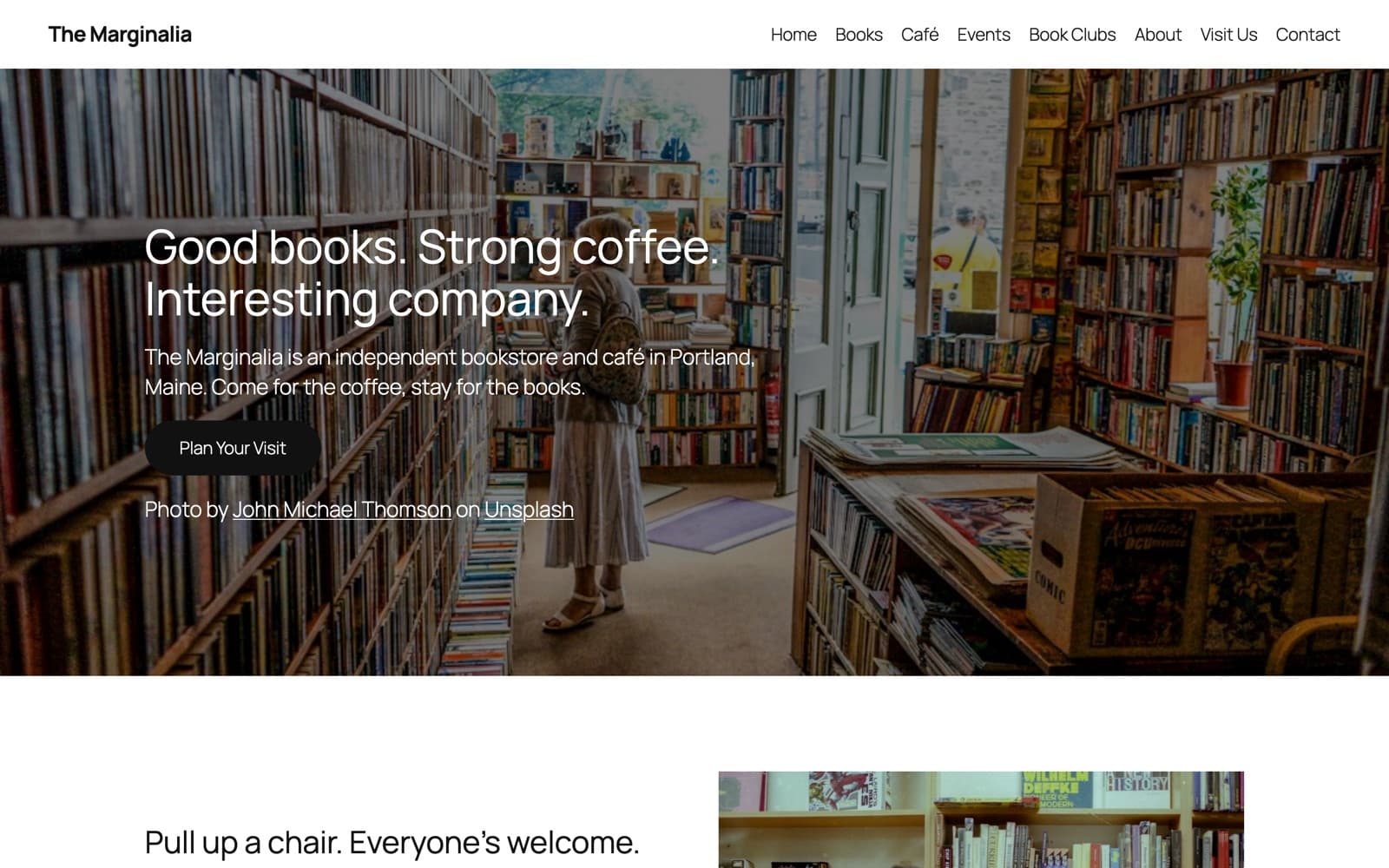
The Marginalia's home page in WordPress after importing the Basic export into the default Twenty Twenty-Five theme.
WordPress: Basic, imported into the default Twenty Twenty-Five theme. Your theme supplies the fonts, colors and buttons.
WordPress · SiteDraft Starter
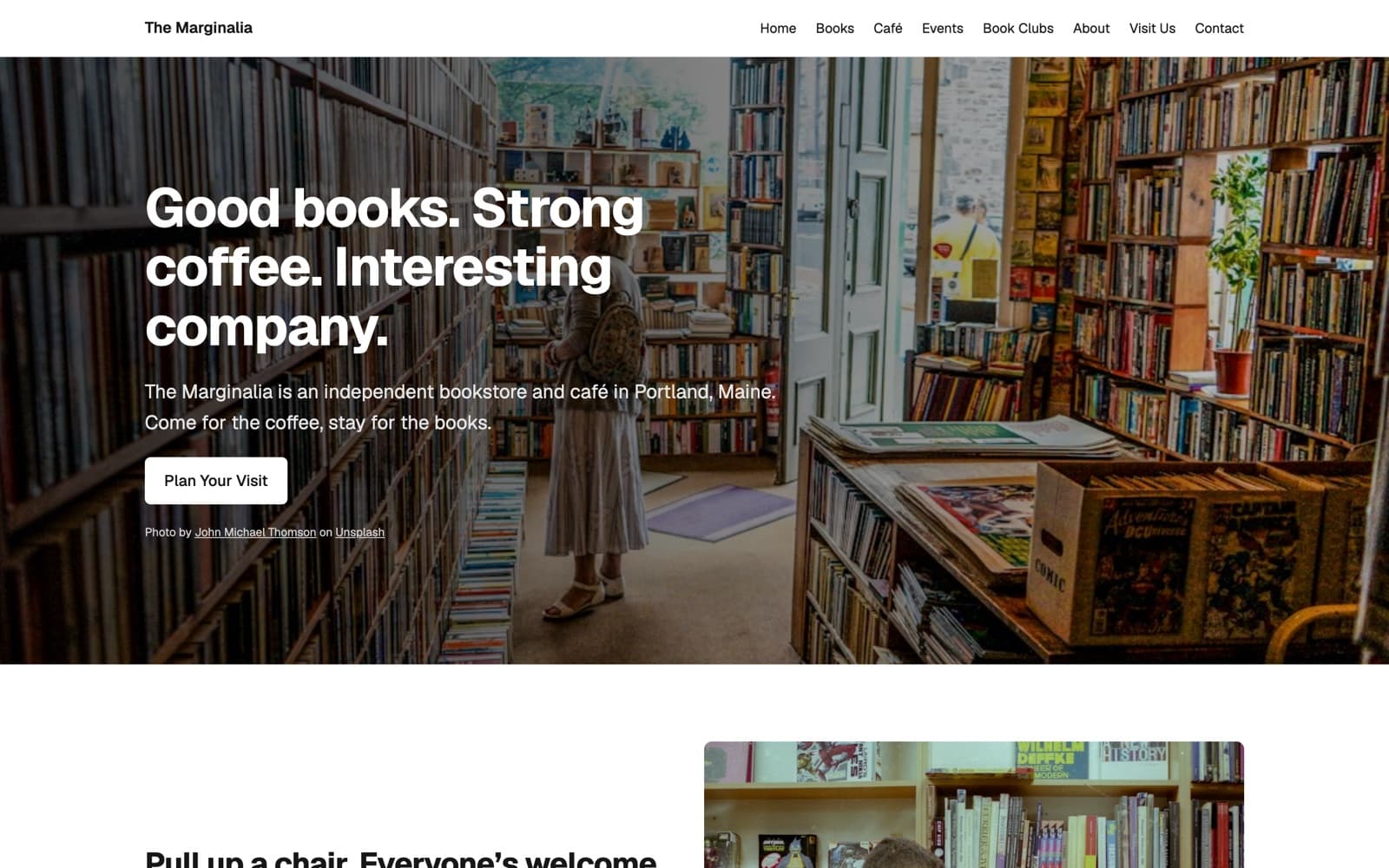
The Marginalia's home page in WordPress after importing the styled export with the SiteDraft Starter theme: bold headline, white button and photo credit over the hero photo.
WordPress: SiteDraft Starter, the styled version with an optional starter theme you're free to rework. Pages, menu, photos and credits came in with the import.

Real screenshots of a fictional example business, not mock-ups. See the examples.

HTML/CSSIncluded
A static site styled like the preview: one HTML file per page with its SEO title and meta description, one stylesheet, images and font included. Opens from a folder or uploads to any host.
JSONIncluded
The whole blueprint as one structured file (pages, sections, images, SEO and what's missing) for your own tools or CMS, described by a public JSON Schema.
WordPress: BasicAdd-on
Editable Gutenberg pages with subpages, a menu and SEO for Yoast or Rank Math. Layout only, so your own theme supplies the fonts, colors and buttons.
WordPress: SiteDraft StarterAdd-on
The same import styled like the preview, plus an optional starter theme with a header, menu and footer that you're free to rework.

HTML/CSS and JSON come with every paid project. WordPress Export is an add-on per project that covers both WordPress versions, and it's included with Unlimited. See Pricing.

And also

The useful details.

Available

Client intake link

Send clients one private link for the questionnaire, follow-up questions and photos.

No account needed. Their answers land in your project, and you can see when they're working on it.

Available

Client reminders

Gentle email reminders with the client's progress and a link straight back to their questionnaire.

Every few days, a few times at most. They stop when the client finishes or unsubscribes, and replies come to you.

Available

Edit, rewrite and keep

Edit any section in place, rewrite just one section, and pin what you want to keep.

Rewrites work around pinned and edited content, and every AI change can be undone.

Available

Business details stay in sync

Phone, email, address and hours are filled in from one place.

Change a number once and every page that mentions it updates. Nothing is guessed.

Available

Stock and client photos

Search Unsplash or Pixabay for atmosphere shots; collect real photos from the client.

Stock is only suggested where it's appropriate. Credits are kept with every stock photo.

Available

SEO titles and descriptions

A search title and meta description for every page, kept within search-friendly lengths.

Your edits are kept, and every export carries them: HTML, Yoast or Rank Math in WordPress, and JSON.

Available

Page preview

See each page as a plain website, with every gap highlighted.

A quick way to check structure and flow before you start designing.

Available

Team profiles

Collect staff details and headshots through individual links, then draft consistent bios.

Team sections use these profiles directly. The client can add their own people.

Planned

Markdown export

The same content as Markdown files, for static site generators and docs-style handoffs.

Built on the same export model as the WordPress and HTML exports.

Enough groundwork. Let's make something.

Start with a thoughtful blueprint, useful content, and a little less busywork.

Start Your First Website Project